Working Principle
Design Input
Design files are created using software such as RDWorks or LightBurn.Data Processing
The RD motherboard processes vector and raster data, converting it into motion and laser commands.Motion Control
Pulse and direction signals are sent to motor drivers to move stepper or servo motors accurately.Laser Control
The motherboard sends PWM or analog signals to the laser power supply to control laser intensity.Real-Time Monitoring
Sensors and limit switches provide feedback to ensure safe and accurate operation.
5. Key Components and Ports
5.1 Motor Control Interfaces
X, Y, Z axis pulse and direction outputs
Compatible with stepper and servo drivers
5.2 Laser Control Ports
Laser enable (L-ON)
PWM/analog power control
Water protection and interlock signals
5.3 Input/Output (I/O) Ports
Limit switches
Emergency stop
Door protection
Water flow sensor
5.4 Communication Ports
USB
Ethernet (network connection)
U-disk (offline operation)
5.5 Control Panel Interface
LCD display
Keypad or touchscreen
Real-time parameter adjustment
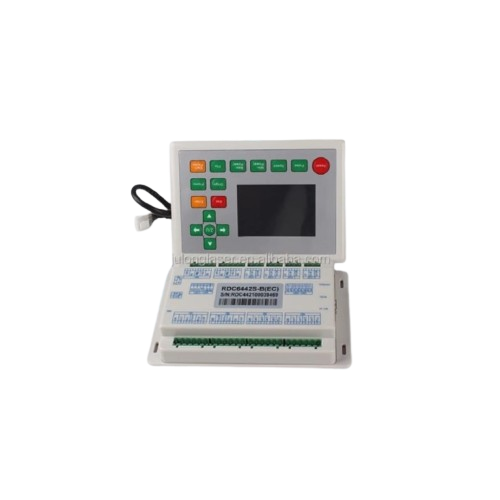
6. Popular RD Motherboard Models
RD6442 – Widely used, supports dual laser heads
RD6445 – Enhanced performance and more I/O
RD6442S – Compact and cost-effective
RD6445G – Supports servo motors and advanced functions
7. Software Compatibility
RD motherboards are compatible with:
RDWorks (official software)
LightBurn (popular third-party software)
Supported file formats include:
DXF
AI
PLT
BMP
JPG
8. Advantages of RD Motherboard
High motion accuracy
Stable and reliable performance
User-friendly interface
Supports offline operation
Strong software compatibility
Widely available technical support
9. Limitations
Learning curve for advanced settings
Requires proper wiring and grounding
Limited customization compared to open-source controllers
10. Installation and Setup
Installation steps include:
Proper mounting inside control cabinet
Correct wiring of motors, drivers, and power supply
Configuration of machine parameters
Axis calibration and limit setting
Proper grounding and shielding are essential to avoid electrical noise issues.
11. Maintenance and Troubleshooting
Regularly check connectors and wiring
Keep board free from dust and moisture
Update firmware when required
Monitor error codes on display panel
Common issues include communication errors, limit switch faults, and laser firing problems.
12. Applications
CO₂ laser cutting machines
Laser engraving machines
Acrylic and wood processing machines
Textile and leather laser machines
Advertising and signage industry
13. Comparison with Other Controllers
| Feature | RD Motherboard | DSP Controllers |
|---|---|---|
| Stability | High | Moderate |
| Software Support | Excellent | Limited |
| Offline Use | Yes | Yes |
| Industrial Use | Widely adopted | Less common |
14. Future Developments
Better integration with cameras (CCD systems)
Enhanced motion control for high-speed machines
Improved UI and networking capabilities
AI-based fault detection
15. Conclusion
The RD motherboard (Ruida controller) is a critical component of modern laser machines, providing precise motion control, stable laser output, and flexible operation. Its reliability, advanced features, and strong software support make it one of the most preferred laser control systems in the industry.
If you want, I can:
Simplify this for students or exams
Focus on wiring and pin description
Compare RD vs Trocen controllers
Convert this into a service manual or PPT content
Display Mother Board Details or Price:
1. Mother board (6442)- 37800 TK
2. Mother board (6445)-38850 TK


